MiloMint: earn screen time with chores, a tracker not a device lock
MiloMint lets kids earn screen time with chores: the day's screen-time minutes are unlocked by finishing the day's tasks rather than handed out by default. Parents set each child two budgets, a weekday amount and a weekend amount, and can pause or reduce the earned minutes at any time. An optional Wind-Down Plan can gently taper the daily limit over several weeks, with a streak for staying under, for families who want to ease screen time down over time. One thing must be plainly stated, the same way our screen-time page says it: MiloMint does not directly block or lock apps on the device. It is a parent-managed agreement and tracker, not a hard device lock. It keeps the deal honest and visible, shows what a child earned, and lets you stay in control, but the actual device limits live in your phone's own settings. MiloMint runs on iOS.
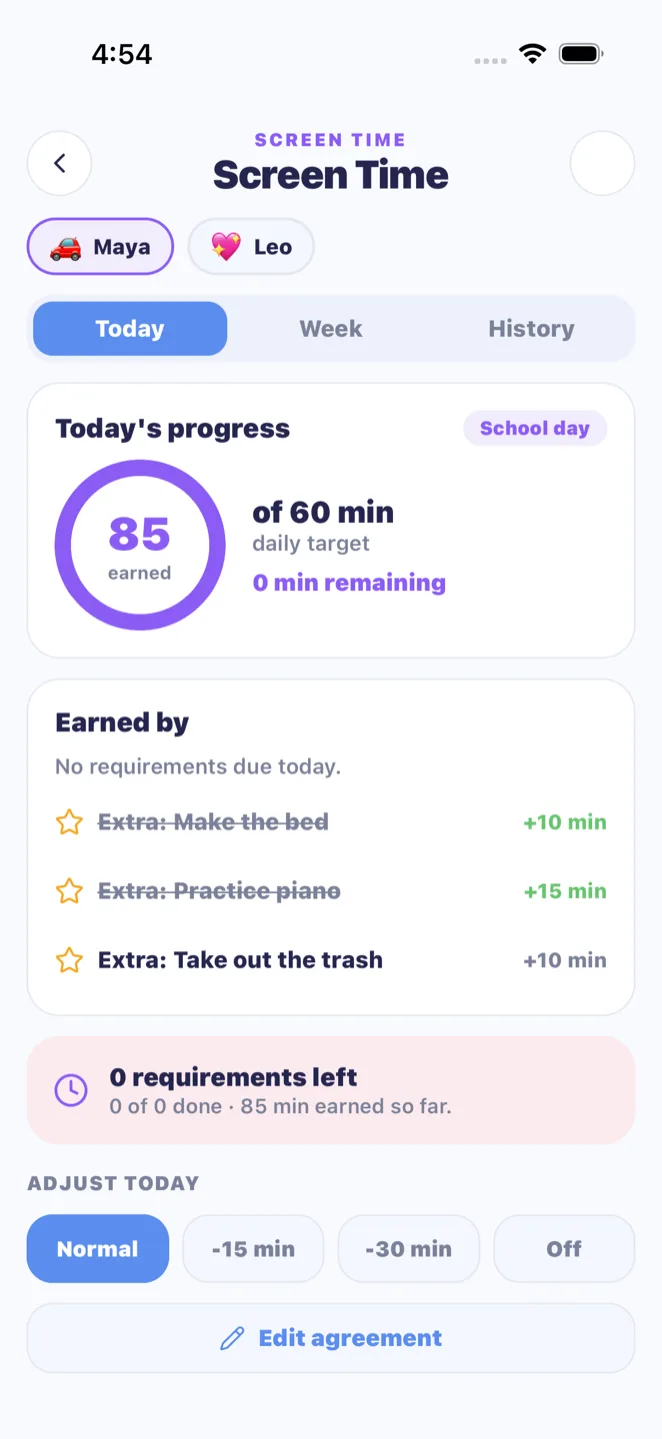
The mechanic at the center of MiloMint is simple: a child earns the day's screen-time minutes by finishing the day's tasks. Each day a child has their requirements, the chores, homework, and routines due that day, and the day's screen-time budget stays locked until those are done and approved by a parent. The child's view shows exactly where they stand, such as finish two more tasks to unlock your sixty minutes, so there is never any mystery about what stands between them and the tablet. When the last requirement is approved, the minutes unlock. This reframes screen time from something kids beg for into something they earn, and it gives a parent a calm, automatic answer to can I have the tablet: finish your list first. Because the requirements are just whatever is already due that day, you are not building a separate screen-time chart; the tasks that run your day are the same ones that unlock the minutes.
Separate weekday and weekend budgets
Families rarely want the same screen-time rules on a Tuesday as on a Saturday, so MiloMint gives every child two budgets: a weekday amount and a weekend amount. You might set sixty minutes on school days and ninety on weekends, but the numbers are yours to choose per child. The app knows the difference on its own, treating Monday through Friday as school days and the weekend as the weekend, and applies the right budget without you flipping a switch. That means a child sees a realistic target for the day they are actually in, tighter on a school night when homework and bedtime matter, looser on a weekend when there is more free time. Because both budgets live on each child's profile, you can also run different amounts for different ages, giving an older child more weekend minutes than a younger one while both still have to earn the time by finishing their tasks.
Pause or reduce, any day
Earned screen time does not take control away from the parent. MiloMint lets you override any given day in two ways. You can pause screen time entirely, turning the day off regardless of whether the tasks were finished, which is useful when the rules were broken or the device came home late. Or you can reduce the earned minutes by a set amount, so a child who did finish their tasks still earns time, just less of it, with a reason you can attach. The child's view explains the override in plain, age-appropriate language, so there is no mystery and no loophole to argue around. This keeps the system fair in both directions: the child can count on earning their minutes by doing the work, and the parent keeps the final say whenever real life calls for it. The deal is dependable for the kid and still flexible for the adult who knows what actually happened today.
The Wind-Down Plan tapers limits over weeks
For families who feel the daily number is simply too high and want to bring it down gently, MiloMint offers an optional Wind-Down Plan. Rather than cutting screen time in one jarring drop, the plan tapers the daily limit gradually over several weeks, with a streak that rewards a child for staying under the limit. The taper is slow on purpose, because a sudden cut invites a fight while a gradual one becomes the new normal almost without notice. The streak turns staying under into a small game the child can win, so winding down feels like an accomplishment rather than a punishment. It pairs naturally with the rest of MiloMint, where reading is the thing a child builds up and screen time is the thing they wind down. The plan is entirely optional; many families just use the daily budgets, but for those who want a structured way to reduce screen time over time, the taper and streak give them a humane path.
A tracker and agreement, not a device lock
This must be said plainly, because honesty here is the whole point: MiloMint does not directly block or lock apps on the device. It is a parent-managed agreement and tracker, not a hard device lock, exactly as our screen-time page states. MiloMint computes whether the day's tasks are done, shows the minutes a child has earned, and keeps both parent and child looking at the same status, but it does not reach into iOS and shut off the apps. Families use it alongside the device's own built-in controls: MiloMint manages the agreement and the motivation, your phone's settings manage the hardware. We are deliberate about not overclaiming this, because a tool that pretends to be a lock and is not would erode the trust the whole system depends on. What MiloMint does extremely well is make the deal earn your minutes by finishing your tasks clear, fair, and visible to everyone, which is what actually ends the daily argument.
Frequently asked questions
How do kids earn screen time with chores in MiloMint?
Each day's screen-time minutes stay locked until the child finishes the day's tasks, the chores, homework, and routines due that day, and a parent approves them. The child's view shows how many tasks remain, and when the last one is approved the minutes unlock.
Does MiloMint block or lock apps on the device?
No. MiloMint does not directly block or lock apps. It is a parent-managed agreement and tracker, not a hard device lock. It shows the minutes a child earned and keeps the deal visible, but the actual device limits live in your phone's own built-in settings.
Can I set different screen time for weekdays and weekends?
Yes. Each child has a weekday budget and a weekend budget, for example sixty minutes on school days and ninety on weekends. MiloMint applies the right one automatically, treating Monday through Friday as school days, so you never have to switch the rules by hand.
Can parents pause or reduce earned screen time?
Yes. You can pause screen time entirely for a day regardless of finished tasks, or reduce the earned minutes by a set amount with a reason. The child's view explains the override in plain language, so the parent always keeps the final say while the deal stays fair.
What is the Wind-Down Plan?
The Wind-Down Plan is an optional setting that gently tapers a child's daily screen-time limit over several weeks, with a streak for staying under. It gives families a humane, gradual way to reduce screen time over time instead of one jarring cut, and it pairs with building reading up.
Is this on iOS?
Yes, MiloMint runs on iOS. The earned screen-time system, separate weekday and weekend budgets, parent pause and reduce overrides, and the optional Wind-Down Plan are all part of the app. Remember it tracks and motivates the agreement; it does not lock the device itself.