MiloMint: a screen time app for kids where screen time is earned, not given
MiloMint is a screen time app for kids built on one mechanic: screen time is earned by finishing the day's tasks, not handed out by default. It is for parents tired of the daily fight over the tablet who want the device to be the natural payoff for getting things done. You set each child a daily budget, with separate amounts for school days and weekends, and that budget stays locked until the child finishes everything required for the day. When the last required task is approved, the day's minutes unlock and the app shows a clear "minutes unlocked" message; until then it shows how many tasks remain. Parents stay in control and can pause screen time entirely or reduce the earned minutes for a day. A built-in carry-over rule means a bad day yesterday has a small consequence today. MiloMint is free on the App Store now, with Android coming soon.
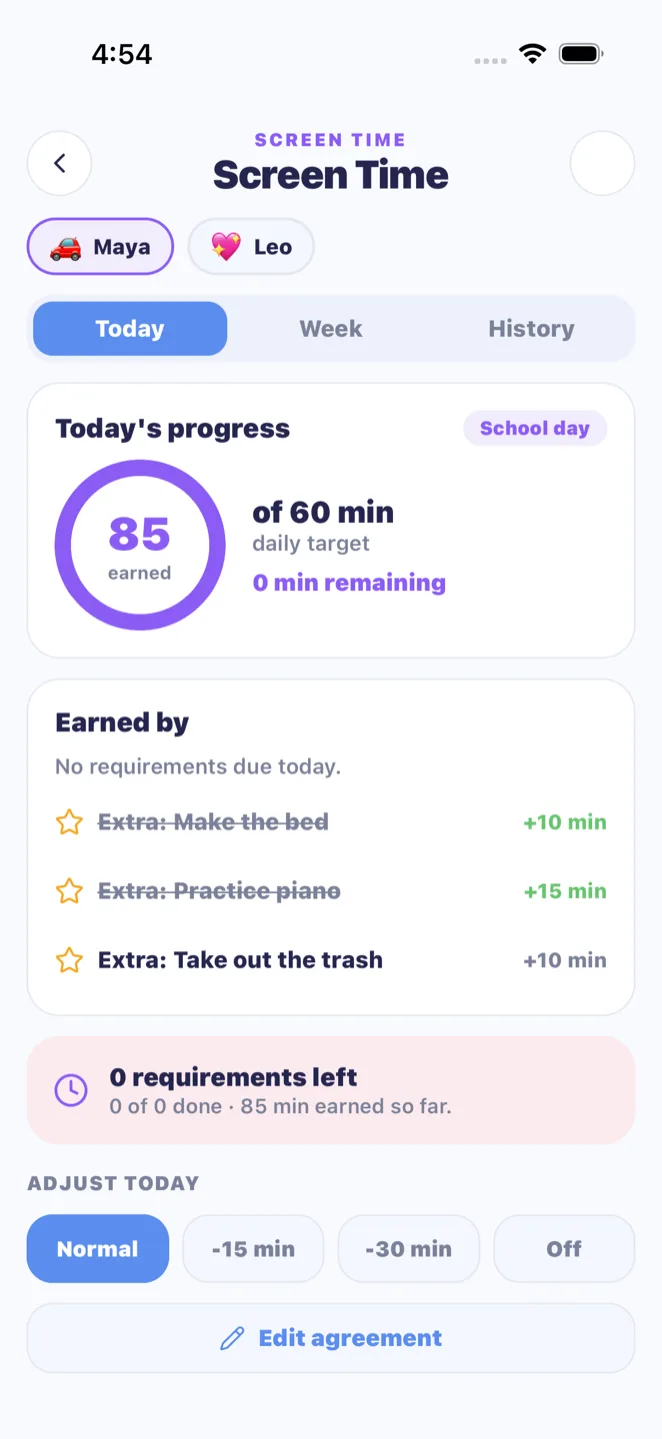
The core of MiloMint's screen-time system is a simple gate. Each day a child has a set of requirements, the chores, homework, and routines due that day, and the day's screen-time budget stays locked until every one of them is approved by a parent. The child's Today view shows exactly where they stand, such as "Finish two more tasks to unlock your sixty minutes today," and notes when tasks are merely waiting on a parent's approval. The moment the last requirement is approved, the gate flips and the screen shows a celebratory "sixty minutes unlocked." Because submitting is separate from approving, a child cannot unlock screen time by simply marking things done; an adult still signs off. This turns screen time from a thing kids beg for into a thing they earn, and it gives a parent a calm, automatic answer to "can I have the tablet?": finish your list first. Because the requirements are simply whatever is due that day, chores, homework, and routines alike, you are not setting up a separate screen-time chart; the same tasks that already run your day are the ones that unlock the minutes, so the system stays in sync without any extra bookkeeping.
School-day budgets versus weekend budgets
Most families do not want the same screen-time rules on a Tuesday as on a Saturday, so MiloMint gives every child two budgets: a weekday amount and a weekend amount. A typical setup might be sixty minutes on school days and ninety minutes on weekends, but you choose the numbers per child. The app automatically knows the difference, treating Monday through Friday as school days and Saturday and Sunday as weekend, and applies the right budget without you switching anything. This means a child sees a realistic target for the day they are actually in: tighter on a school night when homework and bedtime matter, looser on a weekend when there is more free time. Because the two budgets live on each child's profile, you can also run different rules for different ages, giving a thirteen-year-old more weekend minutes than a seven-year-old while both still have to earn them. The split also matches how motivation actually works in a family: a tighter weekday number keeps homework and bedtime protected when the stakes are highest, while a more generous weekend keeps the system feeling fair rather than punitive, so kids buy into earning instead of resenting it.
Parents can pause or reduce any day
Earned screen time is not a contract a parent gives up control over. MiloMint lets you override any given day in two ways. You can block screen time entirely, which turns the day off regardless of whether tasks were finished, useful when the rules were broken or the device came home late. Or you can reduce the earned minutes by a set amount, so a child who finished their tasks still earns time but less of it, with a reason you can attach like "arguing about bedtime." The kid view explains the override in plain, age-appropriate language, for example "A parent turned off screen time today," so there is no mystery and no negotiation loophole. This keeps the system fair in both directions: the child can rely on earning their minutes by doing the work, and the parent keeps the final say when real life calls for it.
The carry-over rule for a missed day
A privilege system needs a consequence that is real but not crushing, so MiloMint includes a carry-over lock. If a child missed more than one of yesterday's required tasks, today starts locked, and the app tells the child plainly: "Locked today: more than one requirement was missed yesterday. Finish today's tasks so tomorrow is unlocked." One slipped task does not trigger it, which keeps the rule humane, but a genuinely blown-off day carries into the next morning. This is deliberately forward-looking: the path out is always to do today's work, which keeps the message about building good habits rather than punishment. Combined with the daily review that marks unfinished tasks as missed, the carry-over rule means screen time reflects a child's recent pattern, not just the current hour, and it gives parents a built-in answer when yesterday was a disaster and today's tablet request arrives.
One status both you and your child can see
What makes earned screen time stop being an argument is that the parent and the child are always looking at the same status, described in two voices. MiloMint computes one screen-time state per child each day, then shows it to the kid as "Finish two more tasks to unlock your sixty minutes" and to the parent as "Maya has two more tasks to unlock sixty minutes today, one waiting for your approval." When the day is earned, both see the celebratory unlocked message; when you reduce or block it, both see the same reason. Because the two views are generated from a single source rather than maintained separately, they can never contradict each other, which removes the classic loophole where a kid claims the rules said something different. The result is a calm, shared scoreboard: the child knows exactly what stands between them and their minutes, and you are never put on the spot to adjudicate from memory.
Frequently asked questions
How does screen time unlock in MiloMint?
MiloMint unlocks the day's screen-time budget only after every task required that day is approved by a parent. The child's Today view shows how many tasks remain, and when the last one is approved the minutes unlock with a clear message. Submitting alone does not unlock it; approval does.
Can I set different screen time for school days and weekends?
Yes. MiloMint gives each child a weekday budget and a weekend budget, for example sixty minutes on school days and ninety on weekends. The app automatically applies the right amount, treating Monday through Friday as school days, so you never have to switch the rules manually.
Can parents turn off or reduce screen time?
MiloMint lets parents override any day. You can block screen time entirely regardless of finished tasks, or reduce the earned minutes by a set amount with an optional reason. The child's view explains the override in plain language, so the parent always keeps the final say.
What happens if my child misses tasks one day?
MiloMint has a carry-over rule. If a child missed more than one required task yesterday, today starts locked until they finish today's work, which then unlocks tomorrow. A single missed task does not trigger it, keeping the rule fair while still making a blown-off day matter.
Does MiloMint block apps or control the device directly?
MiloMint is a screen-time motivation and agreement tool, not a device-level blocker. It tracks whether the day's tasks are done and shows the minutes a child has earned, so families use it alongside their own device settings. It manages the agreement, not the hardware.
Is the screen time feature free, and is it on iOS?
MiloMint's earned screen-time system is free to start and runs in the free iOS app on the App Store, with Android coming soon. There is no real money involved; screen time is unlocked by finishing tasks, and parents set the budgets and any overrides themselves.