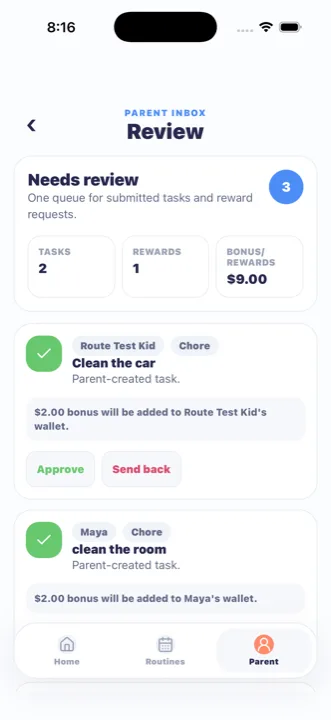
MiloMint: one parent approval queue for chores, rewards, and reward time
MiloMint is built around a single parent approval queue: nothing affecting a child's allowance or rewards changes without an adult signing off, and signing off takes seconds. It is for parents who like chore charts and reward systems but have watched them die because reviewing became too much work or money quietly moved without anyone deciding. In MiloMint, when a child finishes a chore or homework item, it does not pay itself; it lands in the review queue. When a child wants a reward, they send a request that waits for approval, not an automatic deduction. Reward time can also wait for your tap rather than posting on its own. You approve, send back with a reason, or deny, and every decision shows up in plain language in the wallet history. This keeps the family ledger honest and explainable. MiloMint is free on the App Store, with Android coming soon.
Most chore and reward apps fail at the same point: the moment a child can change their own balance, the parent loses trust in the numbers, and the system gets abandoned. MiloMint makes parent approval the spine rather than an afterthought. A child's job is to do the work and submit it; an adult's job is to decide whether it counts. Because that boundary is enforced everywhere, the wallet balance is always something the parent actually authorized. This is what lets you hand a phone to a seven-year-old without worry, and it is what makes the ledger worth showing a child during a money conversation. Approval is not bureaucracy here; it is the thing that keeps the whole system believable. Without it, a chore tracker is just a wish list the child can grant themselves, which is exactly why so many of them quietly stop being used. Making approval the spine also means there is exactly one place the parent has to look, the queue, rather than hunting through the app for things that need attention; if the queue is empty, the family is caught up, and if it is not, the work to do is right there in front of you.
Approve, send back, or deny without losing history
When a submitted chore reaches the queue, you have real choices, not just a yes button. You can approve it, which posts the reward to the ledger and marks the task done. You can send it back when the room is only half clean, which returns it to the child with a clear reason instead of silently resetting it, so the kid understands what to fix. You can deny a request when it is not appropriate. Crucially, none of these actions erase the record. A sent-back task keeps its trail, an approved chore creates a named earning entry, and a denied reward request stays visible as a decision that was made. This matters because the value of an approval system is partly the paper trail: when a child argues "but I did clean my room," you both can look at what was submitted, what was sent back, and why, rather than relying on competing memories.
Reward requests instead of self-service spending
MiloMint's reward store is request-based on purpose. A family can list rewards like thirty minutes of screen time, a family movie pick, or an ice-cream trip, each with a cost in the family currency. A child does not simply click buy and watch their balance drop; they send a reward request that lands in your queue. You approve or deny it, and only on approval is the cost recorded as a redemption in the ledger. This gives you a beat to say "yes, but after dinner" or "not this week," which is how rewards work in real homes anyway. It also prevents the awkward situation where a child spends their entire balance on a whim the parent would have vetoed. The request step turns redeeming a reward into a small, healthy negotiation rather than a vending-machine transaction, while still letting the child feel ownership of their saved-up balance.
Every change is visible in the wallet history
The flip side of requiring approval is transparency: once you decide, the result must be obvious to everyone. MiloMint writes every approval, bonus, deduction, and redemption into the wallet history with a date and a plain-language label, so the ledger reads like a story rather than a spreadsheet. "Approved: Help with dishes" sits next to "Reading streak bonus" and "30 minutes screen time redeemed." Reward time events appear there too. This means a parent never has to explain a balance from memory and a child never feels that money appeared or vanished by magic. Each entry is tied to the child it belongs to, so siblings keep separate, readable histories, and a redemption like cashing in screen time reads in the same plain ledger as an earned chore, which keeps even the non-money rewards honest and visible. The combination, approval before any change plus a readable record after every change, is what makes MiloMint trustworthy as a family ledger. It is also what makes the weekly money conversation short: you open the history together and the answers are already written down.
Approval keeps kids in their own safe lane
Approval is also what makes MiloMint safe to hand to a child, because the kid login is deliberately powerless over the things that matter. A child signs in with a Kid Code and PIN to a view that can submit work and request rewards but cannot approve anything, cannot edit allowance rules, cannot change another sibling's data, and cannot reach the family's account settings. Every consequential action routes back through a parent. That separation is not just a safety feature; it is what lets approval mean something. If a child could approve their own chores, the queue would be theater. Because they genuinely cannot, the act of a parent tapping approve carries real weight for the kid, and the balance that results is one the whole family can stand behind. Safe-by-design login and parent approval are two halves of the same idea: kids own their effort, parents own the decisions.
Frequently asked questions
What is the parent approval queue in MiloMint?
MiloMint's approval queue is one place where submitted chores, homework, and reward requests wait for a parent decision. Nothing changes a child's balance until you approve it. You can approve, send back with a reason, or deny, and every decision is recorded in plain language in the wallet history.
Can kids change their own balance or spend on their own?
No. In MiloMint children submit work and send reward requests, but only a parent's approval changes the ledger. A reward becomes a redemption only after you approve it. This keeps the balance something a parent authorized, so the numbers stay trustworthy during money conversations.
What happens when I send a task back?
Sending a task back returns it to the child with a clear reason instead of silently resetting it, so they know what to redo. MiloMint keeps the trail, so a sent-back task stays in the record. This avoids arguments by replacing competing memories with a visible history.
How do reward requests work?
MiloMint's reward store is request-based. A child sends a request for a reward like screen time or a movie pick, and it waits in your queue. On approval, the cost is recorded as a redemption in the ledger. This adds a healthy pause instead of vending-machine spending.
Does reward time happen automatically?
It depends on your setting. MiloMint lets each child's allowance run with autopay on, posting the weekly amount automatically on reward time, or autopay off, holding reward time in your review flow. With autopay off, you confirm the week was earned before any balance changes in the ledger.
Is the approval system free, and is it on iOS?
MiloMint's approval queue is free to start, and it's part of the free iOS app on the App Store, with Android coming soon. There are no real-money transactions, so approving a chore or reward only updates the running total in the app, never real money.